8 min read
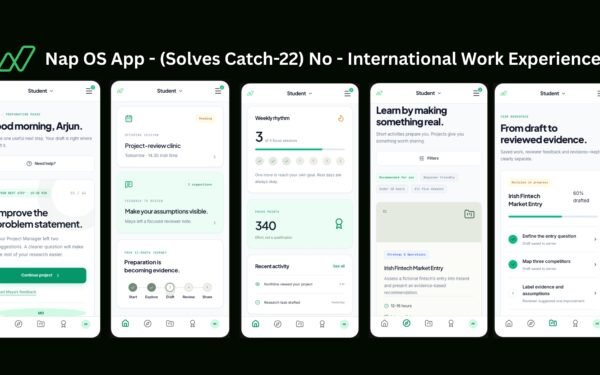
Nap OS is not designed as another learning portal or AI chatbot. It is an execution operating system: a platform that turns real work, decisions, workflows, files, feedback, and outcomes into verifiable professional evidence for students, job seekers, freelancers, universities, and incubators.
Reaching 100,000 monthly active users is therefore not only a traffic challenge. It is a systems challenge: keeping every workspace responsive, every piece of evidence traceable, every AI action controlled, and every institutional deployment secure as usage grows.
The design principle
Nap OS is built around one principle: execution should create evidence automatically.
When a learner completes a workflow, creates a portfolio asset, receives mentor feedback, links a file, or finishes a project milestone, Nap OS retains the relevant context and converts it into a structured signal. This supports features such as execution‑to‑skill mapping, evidence‑weighted scoring, execution replay, learning‑gap detection, portfolio verification, and auditable credentials.
A production AI stack needs more than a model API. It needs data management, inference services, retrieval and context, orchestration, integrations, governance, monitoring, and cost controls working as one system.
The Nap OS architecture
At 100,000 MAU, Nap OS operates as a modular, multi‑tenant platform rather than one large application that tries to do everything at once.
| Layer | What it does in Nap OS | Why it matters at scale |
|---|---|---|
| Experience layer | Desktop‑style workspace, apps, windows, search, dashboards, portfolio views | Keeps the product fast and familiar for every user |
| Identity layer | Authentication, roles, organisations, cohorts, seats and permissions | Separates student, mentor, recruiter, administrator and institutional access |
| Core execution layer | Projects, tasks, workflows, milestones, notes, files and activity events | Captures work as structured, reusable evidence |
| Intelligence layer | Skill mapping, scoring, gap analysis, recommendations, reasoning capture | Converts execution data into career and employability insight |
| Evidence layer | Timestamping, versioning, proof links, verification and audit trails | Makes portfolios defensible rather than self‑reported |
| Automation layer | Event triggers, scheduled workflows, webhooks and integrations | Lets the system act on real activity without manual operations |
| Institution layer | Cohort dashboards, outcomes reporting, certification and analytics | Allows universities to run large programmes with consistent rules |
| Trust layer | Tenant isolation, consent, data ownership, redaction and logs | Protects users and supports enterprise and public‑sector deployment |
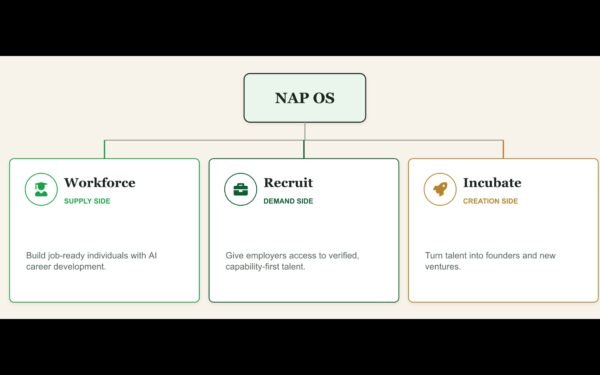
Nap OS is designed as a licensed, installable system for universities and incubation centres, with institutional control, cohort management, system‑led evaluation, and outcome reporting.
Multi‑tenant by default
At 100,000 MAU, Nap OS cannot treat every new university, incubator, freelancer, or learner as a separate product deployment by default. It needs a shared platform with strong logical separation.
A multi‑tenant architecture allows many organisations to use common infrastructure while keeping their data and operations isolated. In practice, every important record carries a tenant identifier, such as an institution ID, organisation ID, cohort ID, workspace ID, and user ID.
This creates clear boundaries:
- A student sees only their own workspace, shared projects, and permitted cohort resources.
- A mentor sees only assigned students or cohorts.
- A university administrator sees aggregated institutional reporting, not unrestricted personal data.
- A recruiter sees only deliberately shared, time‑limited, recruiter‑safe proof.
- A freelancer can separate client projects, client evidence, permissions, and data.
Nap OS treats data isolation, access logs, private proof sharing, evidence redaction, client data segregation, and time‑bound external access as core product controls.
Event‑driven execution data
The most scalable way to understand work is not to repeatedly scan an entire database. It is to record meaningful events as they happen.
For Nap OS, an event might be:
textproject.created
task.completed
file.uploaded
workflow.executed
mentor.feedback_added
portfolio.shared
evidence.verified
skill.signal_updated
credential.issued
Each event can trigger downstream processes without slowing the user interface. For example, when a learner finishes a workflow, Nap OS can asynchronously:
- Store the execution record.
- Link relevant files and decisions.
- Update project progress.
- Generate or update skill signals.
- Queue evidence for scoring.
- Refresh the portfolio timeline.
- Notify a mentor only if intervention is needed.
This architecture is essential because AI analysis, analytics, notifications, and reporting should not make a student wait for a page to load.
AI: reasoning separated from execution
Nap OS uses AI where interpretation adds value and deterministic workflows where accuracy, repeatability, and auditability matter.
For example:
| Product action | Best system approach |
|---|---|
| Save project activity | Deterministic event capture |
| Calculate completion rate | Deterministic analytics |
| Enforce access rules | Deterministic authorization |
| Identify likely skills from evidence | AI‑assisted classification with confidence thresholds |
| Suggest next learning activity | AI recommendation plus rules and user context |
| Explain a portfolio gap | Retrieval‑grounded AI response |
| Issue a professional credential | Rules‑based evaluation with an auditable evidence record |
| Send a reminder | Workflow automation, not an AI decision |
A useful operating model separates workflows, agents, and tools: AI handles interpretation and assistance, while workflows perform repeatable actions and tools connect external systems. This distinction reduces hallucinations, lowers cost, and gives institutions a clearer audit trail.
The AI intelligence layer
Nap OS does not send every user request to one expensive model. It routes each task to the most appropriate intelligence path.
Context and retrieval
For features such as learning‑gap detection, role‑to‑skill analysis, portfolio support, or interview preparation, Nap OS retrieves only the user’s authorised context:
- Approved evidence and portfolio artefacts
- Project milestones and completion history
- Declared target role or programme outcomes
- Mentor feedback
- Skill framework mappings
- Institution‑approved curriculum data
- Job‑market or competency data, where permitted
This keeps AI outputs grounded in actual execution rather than generic advice.
Model routing
A sustainable 100,000‑MAU model does not depend on using the most expensive model for every task.
Nap OS uses:
- Smaller, faster models for categorisation, tagging, summarisation, and routing.
- Higher‑capability models only for complex portfolio analysis, reasoning explanations, or career strategy.
- Rules engines for eligibility, workflows, permissions, certificates, and thresholds.
- Cached outputs for frequently requested insights that do not need to be regenerated.
- Human review queues for low‑confidence or high‑impact decisions.
This improves speed and cost discipline while preserving quality where it matters most.
Evidence is the product moat
Nap OS is built around a different question from traditional education technology: not “What did the user study?” but “What can the user prove they executed?”
The platform’s evidence layer connects files, workflows, timestamps, feedback, decision reasoning, portfolio pages, and results. Nap OS positions features such as evidence linking, timestamped proof, process transparency, authenticity markers, execution replay, and system‑generated credentials within its product foundation.
At scale, this means every major evaluation should be reconstructable:
Skill Signal=f(execution evidence,quality indicators,verification,context)
The exact scoring model can evolve, but the operating principle remains stable: no black‑box score without visible supporting evidence, confidence, and a way for humans to review or override it.
Performance at 100,000 MAU
“100,000 monthly active users” does not mean 100,000 people use Nap OS at exactly the same moment. The infrastructure is designed for peak concurrency: registration periods, assignment deadlines, assessment windows, workshops, and university cohort launches.
The scale strategy includes:
- Stateless application services: Multiple copies behind a load balancer so traffic can be distributed and capacity added horizontally.
- Autoscaling: Increased application and worker capacity during high‑demand periods, then reduced when demand falls.
- Database discipline: Indexed queries, connection pooling, read replicas where needed, and partitioning of large activity or audit tables by tenant and time.
- Caching: Session data, permissions, common templates, public portfolio content, and frequently used reference data.
- Asynchronous workers: AI inference, media processing, reporting, exports, notifications, and large workflow jobs run off the core user‑request path.
- Object storage: Files, media, generated documents, and portfolio assets stored outside the transactional database.
- Content delivery network: Static application assets and public shared portfolio resources served from edge locations.
- Load testing: Testing for at least 10× expected peaks before institutional deployments and major launches.
A simple user journey
Consider a university student building a campaign project in Nap OS:
- They create a campaign workspace and follow a structured execution path.
- They upload research, briefs, creative assets, analytics exports, and final outputs.
- Nap OS records milestones, timestamps, workflow activity, and mentor feedback.
- The intelligence layer maps verified actions to relevant skills and identifies weak evidence.
- The student receives a prompt such as: “Your audience‑research evidence is strong; add a measurable conversion result to strengthen your performance‑marketing proof.”
- When the work meets defined criteria, Nap OS generates an auditable portfolio view and an institution‑governed credential outcome.
- The institution dashboard aggregates progress, completion, evidence quality, and employability signals without exposing unnecessary personal detail.
This is how a system‑led model can help institutions scale execution quality without requiring mentor capacity to grow linearly with student numbers.
Reliability and observability
At 100,000 MAU, the platform must explain not only what happened to users, but what is happening inside the system.
Nap OS monitors:
- Login success and authentication failures
- API latency and error rates
- Database load and slow queries
- Workflow success, retries, and failures
- AI response latency, quality flags, token usage, and cost
- Queue depth for background jobs
- File upload and processing failures
- Per‑tenant activity spikes
- Credential and scoring anomalies
- Notification delivery rates
AI‑native SaaS teams attribute AI and cloud cost to specific features, workflows, and customer segments so that expensive behaviour becomes visible before it harms unit economics. This is particularly important for Nap OS because AI‑generated analysis must remain economically viable across free, student, job‑seeker, freelancer, and institution‑led usage.
Governance and human control
Career, employability, and certification signals can materially affect users. Nap OS therefore needs governance as a core architectural layer, not a later compliance project.
The platform provides:
- Data ownership and export controls
- Tenant and role‑based permissions
- Consent‑aware AI processing
- AI usage logs and audit trails
- Evidence redaction for confidential projects
- Clear explanations for scores and recommendations
- Human override and review pathways
- Versioning for scoring rules, prompts, workflows, and credentials
- Retention policies aligned with institutional and user needs
- Secure external sharing with expiry controls
Nap OS includes a human‑override guarantee, AI suggestion transparency, explainable scoring, access logs, compliance‑ready logs, and data ownership controls in its product capabilities.
The 2026 roadmap
The path to 100,000 MAU is staged rather than built as a single “big platform” release.
| Stage | Priority | Outcome |
|---|
| Stage | Priority | Outcome |
|---|---|---|
| Foundation | Identity, tenancy, workspace data model, audit logging | A secure system of record for execution |
| Product scale | Workflows, evidence capture, portfolio engine, institutional dashboards | Repeatable execution across cohorts |
| Intelligence scale | Retrieval, model routing, scoring confidence, human review | Helpful AI without black‑box dependence |
| Infrastructure scale | Queues, caching, autoscaling, observability, load testing | Reliable performance during peaks |
| Ecosystem scale | APIs, webhooks, integrations, marketplace workflows | Institutions and users can extend Nap OS |
| Governance scale | Consent, reporting, policy controls, evaluation monitoring | Enterprise and public‑sector readiness |
What Nap OS is building
Nap OS is designed to become infrastructure for structured professional execution: a system where people do real work, preserve the evidence, understand the skills they are building, and present credible proof to employers, clients, universities, and partners.
The target is not simply 100,000 active accounts. The target is 100,000 active workspaces that remain fast, private, explainable, institution‑ready, and economically sustainable—while helping users turn effort into outcomes they can verify.