6 min read
Students, graduates, freelancers, and early-stage professionals invest enormous time building portfolios, uploading projects, collecting certifications, and documenting evidence of skill. Yet one critical question often remains unanswered:
Who is actually looking at my profile?
When did they view it?
Are they recruiters, collaborators, or just passive visitors?
Is my portfolio generating real opportunity—or just digital noise?
Napblog Limited addresses this exact gap through one of the most strategically powerful features inside Nap OS:
“Who Viewed?” – Profile View History & Intelligence Layer
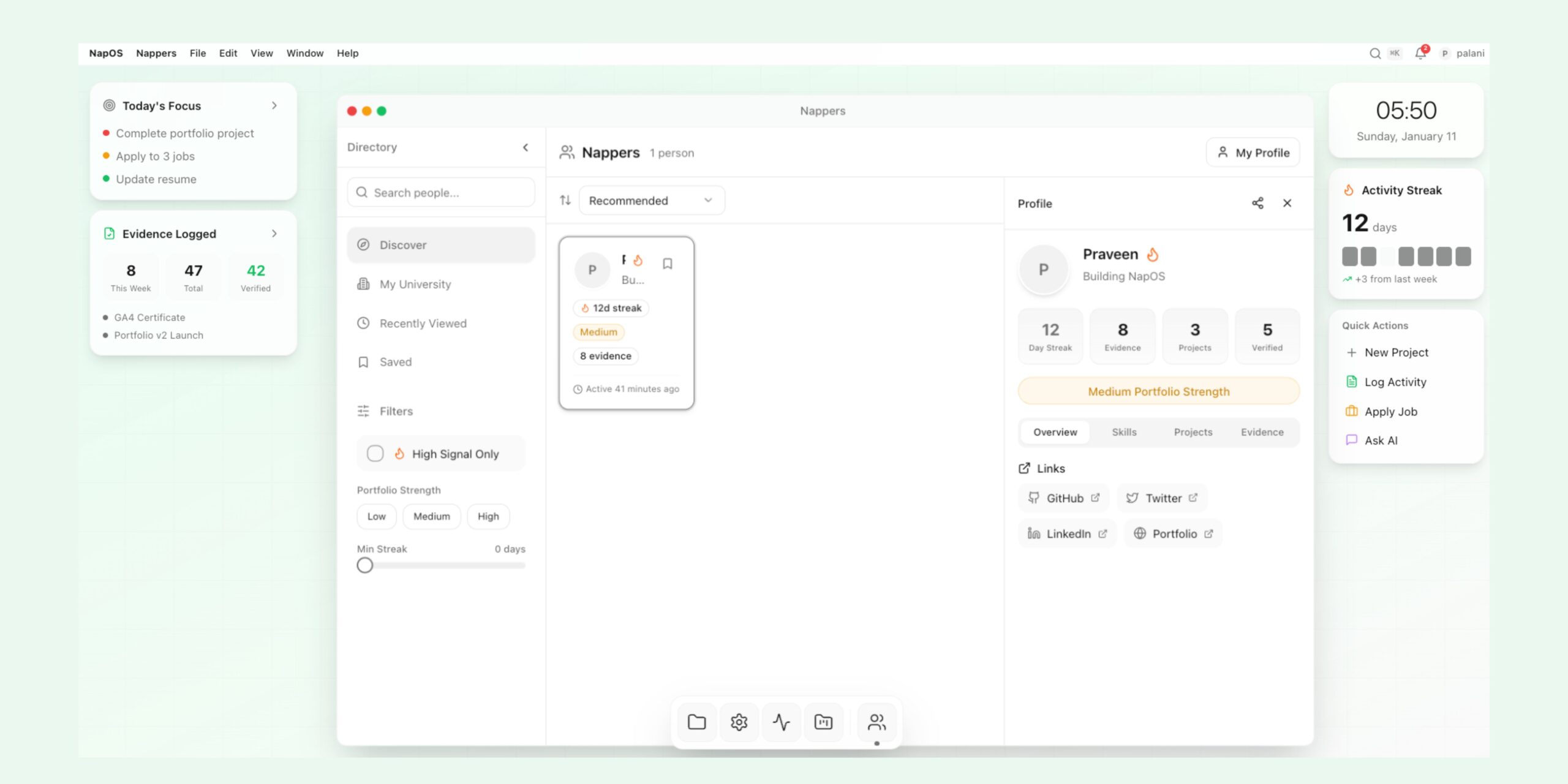
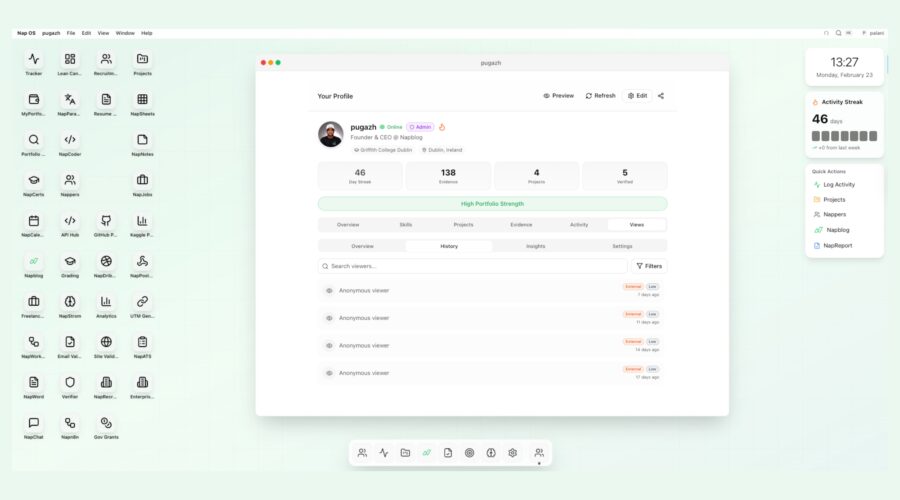
Based on the interface illustrated in the Nap OS dashboard, the “Who Viewed?” module transforms passive visibility into structured, actionable intelligence. It shifts profile viewing from guesswork to measurable engagement analytics.
This is not vanity analytics.
This is career conversion intelligence.
The Problem: Visibility Without Insight
Most professional platforms allow users to publish a profile. Some show view counts. A few display anonymous metrics.
But they fail in three critical areas:
- No contextual intelligence – You may see “5 profile views,” but not what that means.
- No engagement quality scoring – Was the viewer internal, external, high-intent, low-intent?
- No strategic follow-up workflow – You see data, but you cannot act on it intelligently.
For students and early-career professionals, this creates uncertainty:
- Is my profile strong enough?
- Are recruiters seeing my projects?
- Am I being screened and rejected silently?
- Is my evidence compelling?
- Should I optimize something?
Nap OS solves this uncertainty by embedding structured profile-view tracking inside a broader ecosystem of skills, projects, streak analytics, evidence, and verification.
Introducing “Who Viewed?” – A Core Nap OS Intelligence Feature
Within the Nap OS profile interface, users can navigate to:
Profile → Views → History
Inside this structured panel, users see:
- Viewer type (e.g., Anonymous Viewer)
- Engagement tags (e.g., External / Low)
- Timestamp (e.g., 7 days ago, 14 days ago)
- Filter options
- Search viewers
- Historical tracking
This is not just a log. It is a behavioral analytics engine embedded into your professional identity.
What Makes Nap OS Different?
1. Structured Visibility Intelligence
Unlike social platforms that prioritize popularity, Nap OS focuses on professional signal strength.
Each view is categorized and labeled:
- External vs Internal
- Engagement Level (Low / Medium / High)
- Time-based activity
- Portfolio strength correlation
This enables users to understand:
- Where attention is coming from
- Whether engagement is improving
- Whether their portfolio updates are increasing traction
It converts raw views into professional diagnostics.
2. Portfolio Strength Indicator Integration
At the top of the profile interface, Nap OS displays:
High Portfolio Strength
This indicator works in conjunction with:
- Day streak
- Evidence count
- Project uploads
- Verified credentials
- Activity logs
The “Who Viewed?” feature does not exist in isolation. It sits inside a comprehensive skill-verification system.
This means:
If your views increase after adding evidence → That’s measurable validation.
If views stagnate despite activity → Optimization is required.
If external views rise after a project update → Your positioning improved.
Nap OS bridges visibility and performance.
Problems Solved by “Who Viewed?”
Problem 1: Career Blind Spots
Before Nap OS:
- You upload projects.
- You apply to roles.
- You wait.
- Silence.
After Nap OS:
- You see profile activity.
- You identify timing patterns.
- You understand when your profile is being evaluated.
This reduces anxiety and increases strategy.
Problem 2: Passive Engagement Without Follow-Up
Traditional platforms allow views without accountability.
Nap OS adds:
- View categorization
- Engagement tagging
- Filtering
- Timeline analysis
This allows users to:
- Identify spikes in interest
- Match profile updates to view increases
- Measure recruiter attention trends
Problem 3: No Feedback Loop on Profile Optimization
Most students do not know if their:
- Resume structure
- Evidence uploads
- Certifications
- GitHub integration
- Projects
are improving discoverability.
Nap OS creates a feedback loop:
Update → Observe → Analyze → Optimize
This transforms profile building into a measurable process.
Deep Dive: Interface Breakdown
From the provided interface design, we can identify key UX components that support this intelligence system:
1. Search Viewers
Allows users to filter and locate specific view interactions.
2. Filters
Users can segment views by:
- Engagement level
- Internal vs External
- Timeline
3. Historical Timeline
Tracking by:
- 7 days ago
- 11 days ago
- 14 days ago
- 17 days ago
This time segmentation supports behavioral analytics.
4. Engagement Labels
Tags such as:
- External
- Low
These labels introduce an evaluation layer beyond simple counting.
Strategic Career Intelligence Use Cases
Use Case 1: Interview Shortlisting Signals
If a recruiter views your profile 2–3 times within a short window, that suggests:
- Screening stage progression
- Active evaluation
- Shortlisting probability
Nap OS enables you to detect that pattern.
Use Case 2: Application Impact Analysis
After applying to 10 roles, you notice:
- 4 external views within 48 hours
This suggests:
- Resume triggered profile investigation
- Your Nap OS portfolio is being reviewed
This gives you actionable awareness.
Use Case 3: Project Launch Feedback
You upload a new machine learning project with evidence documentation.
Within a week:
- Profile views increase.
- Engagement shifts from Low to Medium.
This signals improved positioning.
USP: Why Nap OS “Who Viewed?” Is Not Just Analytics
Nap OS integrates this feature inside a full productivity operating system including:
- Tracker
- Resume Builder
- Projects
- Portfolio
- Analytics
- GitHub integration
- Certification management
- AI Hub
- NapChat
- ATS tools
The “Who Viewed?” feature therefore becomes:
A conversion node inside a professional operating system.
It is not a social metric.
It is a career optimization metric.
Behavioral Psychology Advantage
Nap OS leverages two psychological drivers:
1. Positive Reinforcement
Seeing engagement encourages:
- Consistency
- Portfolio updates
- Skill documentation
2. Performance Accountability
Low engagement prompts:
- Improvement
- Repositioning
- Stronger project narratives
This drives continuous growth.
From Passive Profile to Active Career Asset
Traditional digital profiles are static.
Nap OS profiles are:
- Measurable
- Tracked
- Verifiable
- Performance-linked
“Who Viewed?” converts your profile into:
A monitored career asset.
Data-Driven Self Awareness
The feature creates professional self-awareness:
- When are you most visible?
- Which updates increase traction?
- Are recruiters browsing but not contacting you?
- Is your activity streak correlating with engagement?
This builds analytical thinking into career development.
Enterprise and Recruiter Benefits
Though user-facing, the system also supports:
- Recruiter transparency
- Internal talent tracking
- Employer analytics
- Structured evaluation logs
This fosters trust between candidates and employers.
Competitive Differentiation
Most platforms offer one of the following:
- Basic view counts
- Anonymous viewer lists
- Premium-only visibility
Nap OS differentiates itself by:
- Embedding view intelligence inside portfolio strength metrics.
- Tagging engagement quality.
- Integrating with verified evidence.
- Connecting analytics to action.
It is not visibility for ego.
It is visibility for optimization.
Transparency as a Trust Mechanism
When professionals know:
- Their work is being reviewed.
- Their profile is being evaluated.
- Their portfolio strength is visible.
They take ownership.
Nap OS promotes professional maturity.
Long-Term Vision
The “Who Viewed?” feature is foundational.
It enables future intelligence layers such as:
- View-to-interview conversion tracking
- Engagement heat maps
- Skill-based interest mapping
- Industry segmentation analytics
- Recruiter intent scoring
- AI-based profile improvement suggestions
This positions Nap OS as:
A career intelligence operating system, not just a profile platform.
Quantifiable Outcomes for Users
Users benefit through:
- Reduced uncertainty
- Improved positioning
- Data-backed profile optimization
- Stronger recruiter targeting
- Increased professional confidence
- Strategic timing awareness
These outcomes lead to:
- Higher interview rates
- Better shortlisting probability
- Clearer career navigation
For Students: Early Competitive Advantage
Students traditionally operate blindly in the job market.
Nap OS changes that.
From Day 1, students can:
- Track engagement.
- Build evidence.
- Measure portfolio strength.
- Understand recruiter behavior.
This builds industry readiness before graduation.
For Freelancers and Creators
Freelancers often struggle with:
- Inbound uncertainty.
- Client ghosting.
- Low visibility feedback.
With Nap OS:
- Profile views become measurable.
- Engagement quality becomes visible.
- Portfolio traction becomes trackable.
This supports commercial growth.
Security and Professional Privacy
While the system provides intelligence, it balances privacy:
- Anonymous viewer labeling.
- Categorized engagement rather than invasive disclosure.
- Structured access visibility.
It respects professional boundaries while enabling insight.
The Broader Nap OS Philosophy
Nap OS is designed as a unified professional operating system:
- Skills documentation
- Evidence validation
- Activity tracking
- Portfolio analytics
- AI-powered insights
- Career intelligence
The “Who Viewed?” module fits within this architecture as:
The Visibility Intelligence Layer.
Conclusion: Visibility with Purpose
Napblog Limited has designed Nap OS not as another profile hosting platform, but as an intelligent ecosystem for career performance.
“Who Viewed?” embodies this philosophy.
It answers critical questions:
- Is your profile attracting attention?
- Is your portfolio compelling?
- Is your engagement improving?
- Are you positioned correctly?
In a competitive talent landscape, information asymmetry disadvantages professionals.
Nap OS removes that asymmetry.
It converts silent evaluation into measurable data.
It transforms uncertainty into strategy.
It upgrades profiles into monitored assets.
Most platforms tell you to build your profile.
Nap OS tells you:
Who is looking at it. When. And what that means.
That is not just a feature.
That is professional intelligence infrastructure.