5 min read
Freelancing has always operated on an invisible contract:
“Trust me — I’ve done the work.”
Clients trust timelines.
Freelancers trust invoices.
Managers trust updates.
Platforms trust ratings.
But no one actually verifies execution.
In the freelance economy, work is communicated through messages, screenshots, spreadsheets, checklists, verbal updates, and occasionally a progress bar that says 80% complete. Yet, what does 80% actually mean? Eighty percent of time spent? Eighty percent of tasks attempted? Eighty percent of output delivered? Or eighty percent confidence that something is moving forward?
This ambiguity is where freelance relationships begin to break down.
Nap OS Projects by Napblog Limited is designed to eliminate this ambiguity by transforming freelance project tracking from communication-based reporting into evidence-based execution.
The Freelance Tracking Problem
Modern freelance work is no longer linear.
A single freelance engagement today may involve:
- Multi-platform marketing campaigns
- SEO implementation
- Paid advertising
- Landing page development
- Automation workflows
- Analytics configuration
- Creative production
- Technical integration
Each of these components may be executed asynchronously, across time zones, devices, and platforms.
Yet most freelance reporting systems still rely on:
- Status meetings
- Email updates
- Notion boards
- Time-tracking logs
- Task checklists
- Verbal confirmation
This results in three critical failures:
1. Time ≠ Work
Freelancers log hours.
But logged hours do not confirm execution.
Eight logged hours may result in:
- A campaign structure
- Keyword research
- A half-configured analytics tag
- Or simply exploratory attempts
Clients cannot distinguish between effort and output.
2. Updates ≠ Progress
A freelancer may report:
“Google Ads campaign setup in progress.”
But progress without proof becomes interpretative.
Has the campaign:
- Been created?
- Been reviewed?
- Passed policy checks?
- Received conversion tracking integration?
- Been connected to analytics?
Without execution evidence, project status becomes conversational.
3. Completion ≠ Verification
A task marked as “Done” inside traditional tools does not guarantee:
- Implementation quality
- Functional deployment
- System compatibility
- Real-world testing
- Output validity
This creates post-delivery friction where clients begin reviewing deliverables long after invoices are raised.
Nap OS Projects: Structuring Freelance Execution
Nap OS Projects introduces a structural execution layer where freelance project tracking occurs through:
- Verified progress logging
- Evidence attachment
- Project state updates
- Execution signal tracking
- Milestone-linked documentation
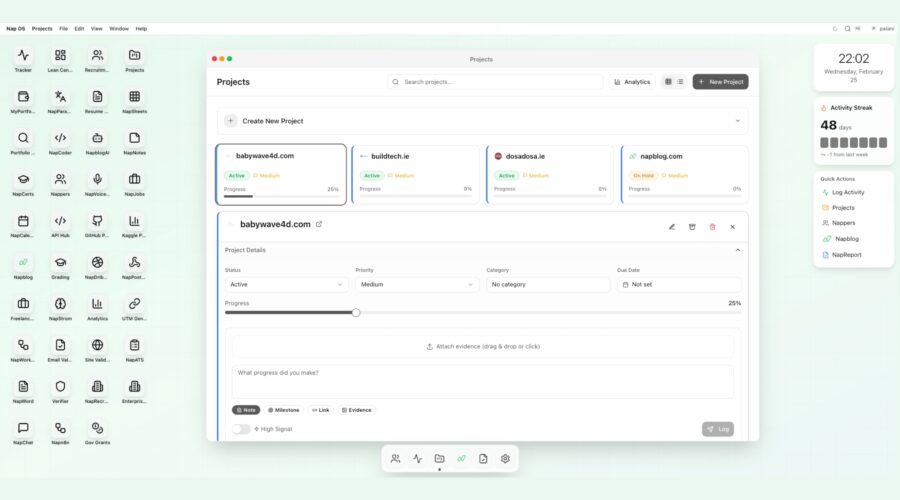
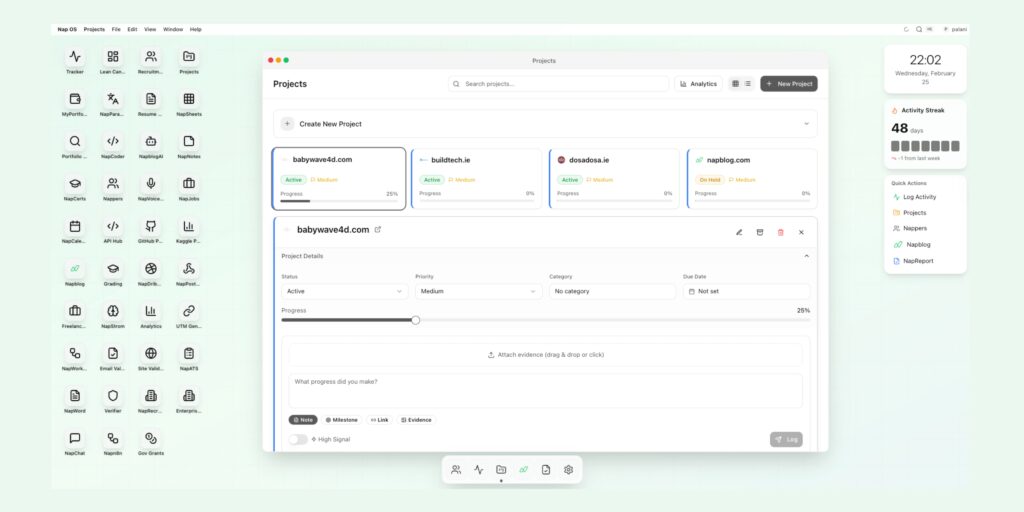
From the interface shown:
Each freelance project is no longer a folder or task board.
It becomes an execution timeline consisting of:
- Project Status
- Priority Level
- Category Assignment
- Due Date Mapping
- Progress Index
- Evidence-Backed Logs
Freelancers move from reporting work to recording execution activity.
Project Creation as an Accountability Event
Inside Nap OS Projects, the act of creating a new freelance project is not administrative.
It is evidential.
Each project created contains structural metadata:
| Parameter | Functional Purpose |
|---|---|
| Status | Defines execution state |
| Priority | Indicates delivery importance |
| Category | Groups project logic |
| Due Date | Anchors timeline |
| Progress | Tracks verified execution |
| Evidence | Validates activity |
From the interface:
Projects such as:
- babywave4d.com
- buildtech.ie
- dosadosa.ie
- napblog.com
are represented with:
- Active / On Hold status
- Medium priority classification
- Progress percentage
- Linked execution logs
The system does not ask:
“What did you work on today?”
It asks:
“What did you execute — and can it be verified?”
Evidence-Based Progress Logging
Freelancers interact with each project through structured logging:
Execution Entry Fields:
- What progress did you make?
- Attach Evidence (Drag & Drop)
- Note
- Milestone
- Link
- File Upload
- High Signal Tag
Each update becomes:
- Timestamped
- Attributable
- Documented
- Linked to execution stage
For example:
A freelance PPC specialist may log:
Implemented conversion tracking for babywave4d.com lead form.
Instead of relying on description alone, they attach:
- Google Tag Manager container version
- Conversion trigger configuration
- Preview mode test result
- Analytics debug confirmation
Now:
Progress moves from statement → verification.
Progress Bars That Reflect Execution
Traditional freelance dashboards use manually adjusted completion percentages.
Nap OS Projects calculates progress through:
- Logged execution frequency
- Milestone completion
- Evidence submission
- Functional update linkage
As shown in the image:
babywave4d.com reflects:
25% Progress
This percentage is not estimated.
It is supported through:
- Submitted execution logs
- Attached implementation evidence
- Logged system updates
Thus, progress becomes defensible.
The High Signal Layer
Not all freelance updates carry equal execution value.
Nap OS Projects introduces a High Signal toggle allowing freelancers to flag:
- Deployment activities
- Functional integrations
- Client-visible outputs
- Performance-impacting updates
- System-level changes
This separates:
Administrative activity
from
Execution-impacting work
Clients reviewing the project timeline can filter by:
High-Signal logs
to understand:
What actually moved the project forward.
Multi-Project Freelance Management
Freelancers typically handle:
3 to 12 concurrent projects.
Nap OS Projects allows each to be:
- Status-tracked
- Evidence-logged
- Timeline-anchored
- Milestone-mapped
from a unified project dashboard.
From the interface:
Each freelance engagement displays:
- Domain Identifier
- Activity Status
- Priority Classification
- Execution Progress
This eliminates the need to:
Switch across task boards
Email threads
Drive folders
Slack channels
Invoice trackers
Work tracking becomes centralized.
Due Date Anchoring
Freelance delivery disputes often arise from:
Unclear deadlines
Moving scope
Client-driven revisions
Delayed approvals
Nap OS Projects links:
Execution logs
with
Due Date assignments
This enables:
Timeline reconstruction.
If a freelance project delivery is questioned:
The freelancer can demonstrate:
- When work began
- When integrations occurred
- When deployment happened
- When review was requested
- When client response arrived
All through timestamped logs.
Client-Facing Transparency
Nap OS Projects can be used internally by freelancers or shared externally with:
- Clients
- Agencies
- Hiring managers
- Audit teams
Providing:
Execution visibility
without
Communication overhead.
Clients no longer need:
Daily standups
Progress meetings
Status calls
They can view:
Evidence-linked project advancement directly.
Beyond Freelance Reporting
Nap OS Projects transforms freelance tracking into:
A professional execution ledger.
Freelancers build:
- Work history
- Implementation proof
- Milestone delivery trails
- Project completion timelines
Over time, this becomes:
A portfolio of verified execution.
Not:
Testimonials
Not:
Ratings
But:
Documented work activity.
Hiring Implications
Freelancers using Nap OS Projects can present:
Project Execution Records
to:
- Potential clients
- Agencies
- Recruiters
- Venture studios
Demonstrating:
Actual implementation ability.
Hiring decisions can move from:
Resume evaluation
to
Execution verification.
Conclusion
Freelancing has matured into a global execution economy.
Yet project tracking still depends on:
Trust-based communication.
Nap OS Projects by Napblog Limited introduces:
Proof-of-Work infrastructure
into freelance delivery systems.
Through:
- Evidence-linked progress
- Execution logging
- Timeline anchoring
- High-Signal activity tagging
Freelancers no longer report work.
They verify it.
And clients no longer interpret progress.
They observe it.
Nap OS Projects is not a task manager.
It is a freelance execution tracking system built for a future where work is measured not by:
Time spent
or
Tasks marked complete
but by:
Implementation proven.