Last updated: February 17, 2026
5 min read
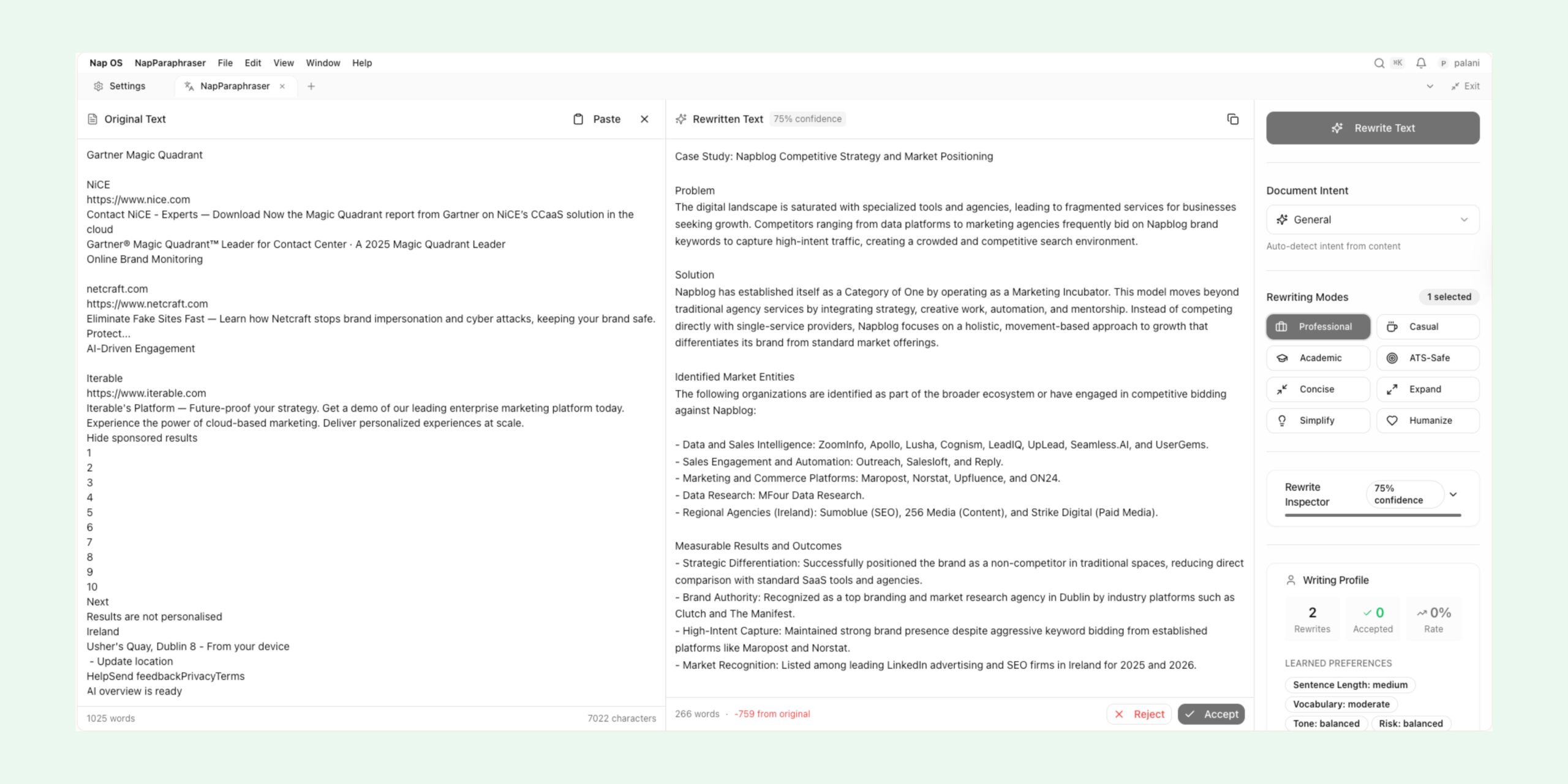
Nap OS introduces NapParaphraser, an intelligence layer designed to transform unstructured, inconsistent, or poorly regulated input into formalized, systematically sorted, time-relevant, and reusable knowledge artifacts. Unlike conventional paraphrasing tools that merely rewrite sentences, NapParaphraser operates as a semantic normalization and structuring engine. It interprets intent, extracts signal from noise, resolves ambiguity, aligns tone and format, and anchors content to relevant temporal and contextual frames.
This newsletter explains why NapParaphraser exists, how it works internally, and what outcomes it enables for students, professionals, founders, and teams operating inside Nap OS.
The Problem NapParaphraser Solves
Most real-world input is messy:
- Notes written in fragments
- Voice-to-text dumps with errors
- Mixed tenses, inconsistent tone, and unclear structure
- Ideas captured out of sequence
- Context scattered across time (yesterday’s thought mixed with last year’s goal)
Traditional tools fail because they assume:
- The input is already structured
- The user knows the final format
- Time relevance is irrelevant
- One rewrite fits all use cases
Nap OS rejects these assumptions.
NapParaphraser is built for reality, not ideal input.
What NapParaphraser Actually Is (and Is Not)
It Is:
- A semantic interpretation engine
- A content normalization system
- A temporal relevance aligner
- A format-aware knowledge transformer
- A context-preserving paraphraser
It Is Not:
- A basic synonym replacer
- A grammar correction tool only
- A single-prompt rewrite feature
NapParaphraser sits between raw thought and finished output, acting as an intelligent intermediary that understands what the content is becoming, not just what it currently is.
Core Design Philosophy
NapParaphraser is built on four principles:
1. Input Agnosticism
Users should not be punished for poor structure. The system assumes:
- Incomplete sentences
- Mixed languages or styles
- Disordered logic
The burden of structure is shifted from the user to the system.
2. Intent Before Expression
NapParaphraser prioritizes what the user means, not how it is written. It decouples:
- Meaning
- Tone
- Format
- Final presentation
This allows one input to generate multiple valid outputs.
3. Time Is a First-Class Variable
Content is always evaluated against:
- When it was written
- What timeframe it references
- Whether it is historical, current, or forward-looking
This enables time-aware paraphrasing, summaries, and prioritization.
4. Systematic Reusability
Every output is structured so it can:
- Be indexed
- Be searched
- Be reused across Nap OS apps
- Feed automation, analytics, and workflows
Internal Architecture Overview
NapParaphraser operates as a multi-stage intelligence pipeline.
Stage 1: Raw Input Ingestion
Accepts:
- Text blocks
- Bullet dumps
- Notes
- Drafts
- Copied content
No assumptions are made about quality or completeness.
Stage 2: Semantic Decomposition
The system breaks input into:
- Atomic ideas
- Claims
- Actions
- Questions
- Assumptions
Each unit is tagged with:
- Confidence level
- Explicit vs implicit meaning
- Dependency on other units
Stage 3: Intent & Context Resolution
NapParaphraser infers:
- Why this content exists
- Who it is for
- What outcome it supports
Signals used include:
- Language cues
- Repetition
- Emphasis
- Missing but implied information
Stage 4: Temporal Anchoring
Each semantic unit is evaluated for:
- Time sensitivity
- Expiry relevance
- Historical vs active vs future state
This allows:
- Sorting by relevance
- Automatic updates
- Timeline-aware summaries
Stage 5: Formalization Engine
Content is rewritten into:
- Clear sentence structures
- Consistent tone (professional, academic, neutral, instructional)
- Logical ordering
This is where paraphrasing happens, but it is informed by all prior stages.
Stage 6: Systematic Sorting
The output is organized by:
- Topic
- Priority
- Time relevance
- Actionability
The same input can produce:
- A formal report
- A task list
- A study note
- A newsletter paragraph
Stage 7: Output Packaging
Final content is delivered as:
- Structured text
- Headings and sections
- Reusable blocks
Ready for use across Nap OS.
Why “Auto-Formalized” Matters
Formalization is not about sounding complex. It is about:
- Precision
- Consistency
- Reusability
- Credibility
NapParaphraser ensures that even casual notes can be transformed into:
- Academic-ready material
- Professional documentation
- Publishable content
This removes friction between thinking and shipping.
Handling Poorly Regulated Input
A defining feature of NapParaphraser is its tolerance for chaos.
Examples of what it can handle:
- Mixed bullet points and paragraphs
- Incomplete thoughts
- Contradictions
- Redundant statements
- Informal language mixed with technical terms
Instead of rejecting or flattening input, the system:
- Identifies contradictions
- Resolves or flags them
- Consolidates repetition
- Clarifies ambiguity
The output is always cleaner than the input, without losing meaning.
Systematic Sorting: Beyond Simple Organization
Sorting is not alphabetical or cosmetic.
NapParaphraser sorts content by:
- Conceptual dependency
- Cause → effect
- Problem → solution
- Idea → execution
This creates cognitive flow, making the output easier to read, understand, and act upon.
Time-Relevant Intelligence
Time relevance enables capabilities such as:
- Automatically surfacing outdated assumptions
- Highlighting urgent vs evergreen content
- Aligning paraphrased output with current goals
For students, this means:
- Notes evolve as exams approach
For professionals:
- Documents stay aligned with current strategy
For founders:
- Ideas mature without being rewritten from scratch
Use Cases Inside Nap OS
Students
- Convert raw lecture notes into structured study guides
- Normalize research dumps into formal summaries
- Prepare assignments from fragmented drafts
Job Seekers
- Refine portfolio descriptions
- Formalize experience notes into CV-ready content
- Maintain time-relevant application materials
Founders
- Turn brainstorming notes into strategy documents
- Keep evolving narratives aligned with current stage
- Prepare investor-ready material without rewriting
Knowledge Workers
- Clean meeting notes
- Standardize documentation
- Maintain clarity across long projects
Why This Is a Nap OS-Native Advantage
NapParaphraser is not a standalone tool. It is embedded in Nap OS, meaning:
- Outputs feed directly into workflows
- Content is indexed across the system
- Insights compound over time
Every interaction improves:
- Personal knowledge graphs
- Automation accuracy
- Analytical depth
Strategic Differentiation
Most AI writing tools optimize for:
- Speed
- Surface-level fluency
NapParaphraser optimizes for:
- Cognitive clarity
- Structural integrity
- Long-term knowledge value
This is why it feels less like “rewriting” and more like thinking with structure.
The Long-Term Vision
NapParaphraser is foundational infrastructure.
As Nap OS evolves, this system will:
- Power adaptive learning paths
- Enable intelligent content reuse
- Support decision intelligence
- Reduce cognitive overhead permanently
The goal is not better text.
The goal is better thinking, captured systematically.
Closing Note
NapParaphraser represents a shift from reactive writing tools to proactive intelligence systems. It respects how humans actually think: non-linear, imperfect, and time-bound.
By absorbing disorder and producing structured, time-aware, formalized output, NapParaphraser becomes a silent partner in every serious intellectual workflow inside Nap OS.
This is not just paraphrasing.
This is knowledge refinement at system scale.
NapParaphraser transforms raw input into structured knowledge for professionals. Learn more on LinkedIn.