Last updated: May 29, 2026
5 min read
Search engine visibility depends on one fundamental process: indexing. If a page is not indexed, it cannot rank in search results, regardless of how valuable the content might be.
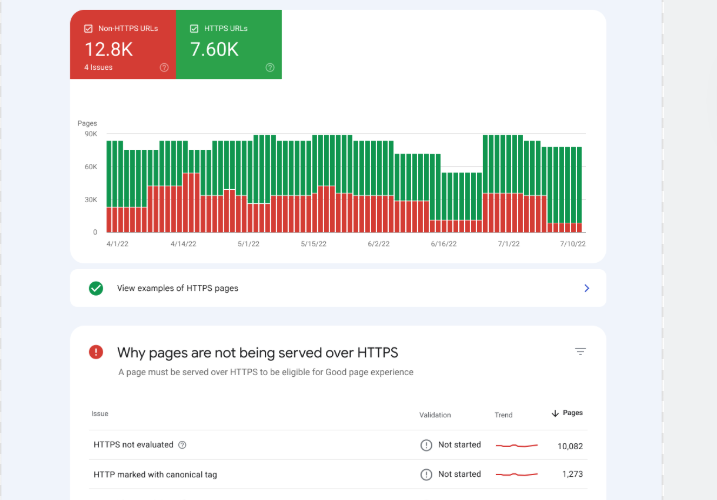
Many website owners discover this problem when they open Google Search Console and see warnings such as:
- Discovered – currently not indexed
- Crawled – currently not indexed
- Duplicate without user-selected canonical
- Alternate page with canonical tag
- Excluded by “noindex” tag
These messages indicate that the search engine has encountered your pages but has decided not to include them in its searchable database.
This article explains how indexing works, why pages fail to index, and the exact steps needed to fix these issues so your content can properly appear in search results.
Understanding the Google Indexing Process
Before fixing indexing issues, it is important to understand the three main steps search engines use.
1. Crawling
Search engines use automated programs called crawlers or bots to discover new pages on the internet.
The crawler follows:
- internal links
- external backlinks
- XML sitemaps
- previously indexed pages
The most well-known crawler is Googlebot, which scans websites and collects page information.
2. Processing
Once crawled, Google analyzes the page’s content, structure, and signals such as:
- text relevance
- page speed
- structured data
- internal linking
- canonical tags
3. Indexing
After analysis, Google decides whether the page deserves to be stored in its search index.
Only indexed pages can appear in search results.
If Google decides not to index the page, the content effectively becomes invisible to search traffic.
Common Indexing Errors in Google Search Console
When investigating indexing problems, website owners usually encounter several recurring messages.
1. Discovered – Currently Not Indexed
This means Google knows the page exists but has not crawled it yet.
Possible reasons include:
- low domain authority
- limited crawl budget
- weak internal linking
- server response issues
Google simply delays crawling because the page is considered low priority.
2. Crawled – Currently Not Indexed
This message means Google visited the page but decided not to add it to the index.
This usually happens due to:
- thin or duplicate content
- low informational value
- template pages
- auto-generated content
Essentially, Google evaluated the page and concluded it does not add enough unique value.
3. Duplicate Without User-Selected Canonical
Google detected multiple pages with similar content and chose another version as the canonical page.
This often occurs due to:
- URL parameters
- multiple category pages
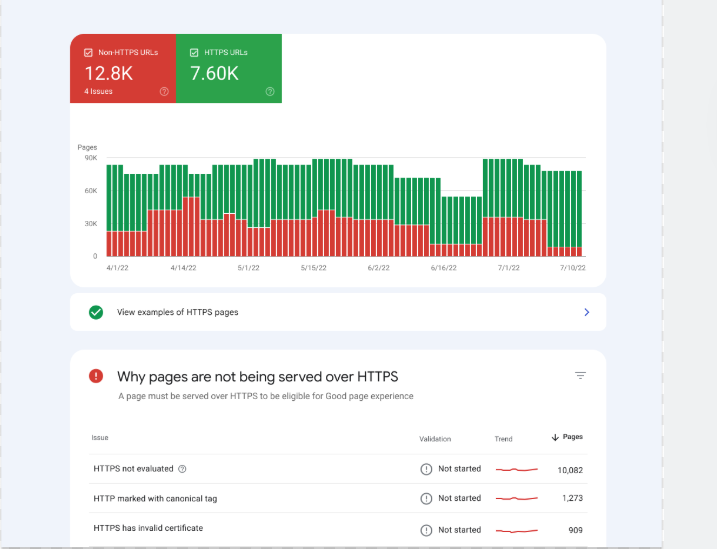
- HTTP vs HTTPS versions
- trailing slash differences
Without a clear canonical signal, Google may ignore your intended page.
4. Page with Redirect
The page redirects to another URL, so Google excludes it from indexing.
While redirects are normal, incorrect redirects can prevent the correct page from ranking.
5. Excluded by “Noindex” Tag
This occurs when the page includes a noindex meta tag telling search engines not to index the page.
Developers often add this tag during development and forget to remove it.
Why Pages Fail to Rank Even When Indexed
Sometimes pages are indexed but still fail to rank. This can happen due to several reasons.
Low Topical Authority
Search engines evaluate whether a website demonstrates consistent expertise in a topic.
Random isolated articles rarely rank.
Weak Internal Linking
Pages with few internal links appear less important to crawlers.
Thin Content
Articles with shallow information may be indexed but still struggle to rank.
Poor Technical Performance
Factors such as:
- slow page speed
- mobile usability problems
- excessive JavaScript
can reduce ranking potential.
Step-by-Step Process to Fix Indexing Problems
Below is a systematic approach used by SEO professionals to resolve indexing issues.
Step 1: Inspect URLs in Google Search Console
Open Google Search Console and use the URL Inspection Tool.
This tool shows:
- index status
- crawl history
- canonical URL selection
- page availability
If the page is not indexed, request indexing after making improvements.
Step 2: Improve Content Quality
Pages marked as “Crawled – currently not indexed” usually require content improvements.
Focus on:
- deeper explanations
- original research
- data insights
- structured headings
- semantic keyword coverage
Search engines prioritize pages that deliver clear informational value.
Step 3: Strengthen Internal Linking
Internal links help search engines discover and prioritize pages.
Best practices include:
- linking from high-authority pages
- using descriptive anchor text
- creating topic clusters
A well-structured internal link network improves crawl efficiency.
Step 4: Submit XML Sitemap
An XML sitemap lists important pages for search engines.
Submit it through Google Search Console so crawlers can easily locate new content.
A clean sitemap helps Google understand:
- page hierarchy
- update frequency
- priority pages
Step 5: Fix Canonical Tags
Ensure every page contains the correct canonical tag.
Example:
<link rel="canonical" href="https://example.com/your-page" />
This tells Google which version of a page should be indexed.
Without this signal, duplicate pages may confuse the crawler.
Step 6: Optimize Crawl Budget
Large websites often suffer from crawl budget issues.
To improve crawl efficiency:
- remove duplicate pages
- block irrelevant pages via robots.txt
- avoid infinite parameter URLs
- minimize redirect chains
This allows search engines to focus on valuable content.
Step 7: Improve Page Speed
Slow pages reduce crawl efficiency and ranking potential.
Optimize by:
- compressing images
- using caching
- minimizing JavaScript
- enabling CDN delivery
Fast pages increase the probability of frequent crawling.
Step 8: Earn External Links
Backlinks remain one of the strongest ranking signals.
Pages with quality backlinks are:
- crawled more frequently
- indexed faster
- ranked higher
Focus on acquiring links through:
- research articles
- guest posts
- industry collaborations
Step 9: Monitor Index Coverage Reports
Regularly review the Index Coverage Report in Google Search Console.
Look for trends such as:
- sudden spikes in excluded pages
- crawl errors
- indexing declines
Continuous monitoring prevents long-term ranking damage.
Preventing Future Indexing Problems
Fixing indexing once is not enough. Websites must maintain technical health over time.
Recommended practices include:
Publish Consistently
Frequent publishing signals site freshness.
Maintain Topic Clusters
Interconnected articles help establish authority.
Avoid Duplicate Content
Use canonical tags and proper URL structure.
Update Old Pages
Refreshing content improves relevance signals.
Final Thoughts
Search visibility begins with a simple truth:
If your page is not indexed, it cannot rank.
Many websites struggle in search results not because their content is poor, but because technical indexing problems prevent search engines from evaluating it properly.
By systematically improving content quality, internal linking, crawl efficiency, and canonical signals, websites can significantly increase the likelihood of indexing and ranking success.
Search engines reward clarity, value, and technical consistency.
When these elements align, indexing becomes faster, ranking becomes possible, and organic visibility begins to grow.