Last updated: May 29, 2026
5 min read
The Problem Students Don’t Realise They Have
Students today are not short on tools. They are short on coordination.
A typical student’s week looks like this:
- Applying for jobs in multiple tabs
- Updating resumes in random folders
- Tracking applications in spreadsheets
- Saving notes in different apps
- Forgetting follow-ups
- Losing evidence of work
- Repeating the same actions again and again
The result is not lack of effort — it is fragmentation.
NapOS was designed to solve this at the operating-system level.
And NapWorkflows is the automation engine that makes it real.
NapWorkflows allows students to connect actions across NapOS apps and external systems, so work flows forward automatically — without relying on memory, discipline, or constant manual effort.
This newsletter explains:
- What NapWorkflows is
- How students can automate both internal NapOS apps and external tools via webhooks
- 15 real-world automation scenarios, delivered as reusable templates
- How this removes chaos and replaces it with momentum
What Is NapWorkflows?
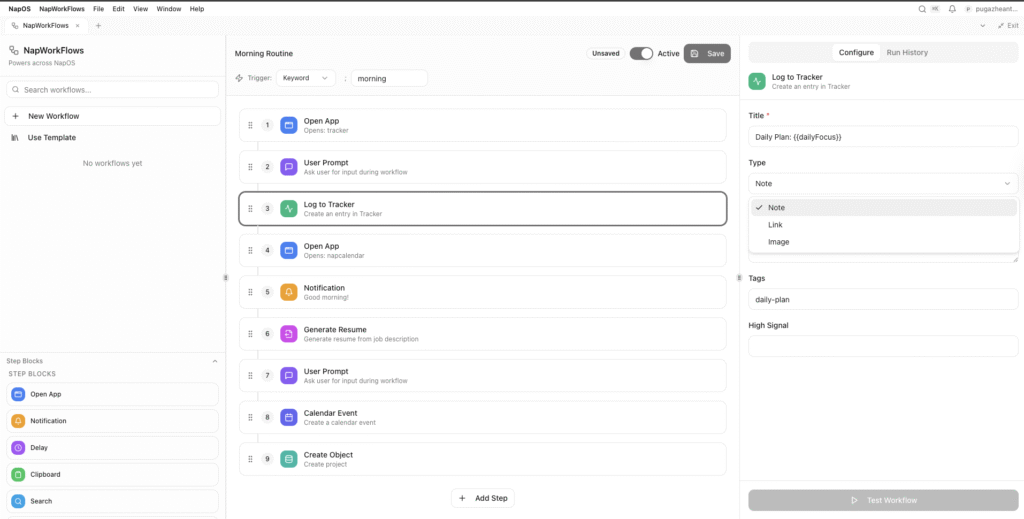
NapWorkflows is a native automation layer inside NapOS.
It allows students to:
- Trigger actions using keywords, schedules, or events
- Chain multiple steps across NapOS apps
- Log work automatically as evidence
- Generate resumes, drafts, analytics, and reminders
- Connect external services using webhooks
- Reuse workflows as templates
Think of it as:
“If this happens → then NapOS does everything else for me.”
Unlike traditional automation tools, NapWorkflows is context-aware:
- It knows what a job application is
- It understands portfolios, trackers, projects, certifications
- It treats student work as evidence, not tasks
Internal + External Automation (Why This Matters)
NapWorkflows works at two levels:
1. Internal Automation (Native NapOS Apps)
- Tracker
- MyPortfolio
- NapFinder
- Projects
- NapCalendar
- NapCerts
- Analytics
- Notifications
These apps share a common context, so actions flow cleanly.
2. External Automation (Webhooks)
- Job boards
- Email services
- Calendars
- Forms
- APIs
- Custom endpoints
This means students can automate real-world systems, not just internal notes.
15 Student Automation Scenarios (With Template Outcomes)
Each scenario below is something students already try to do manually — now converted into a NapWorkflows template.
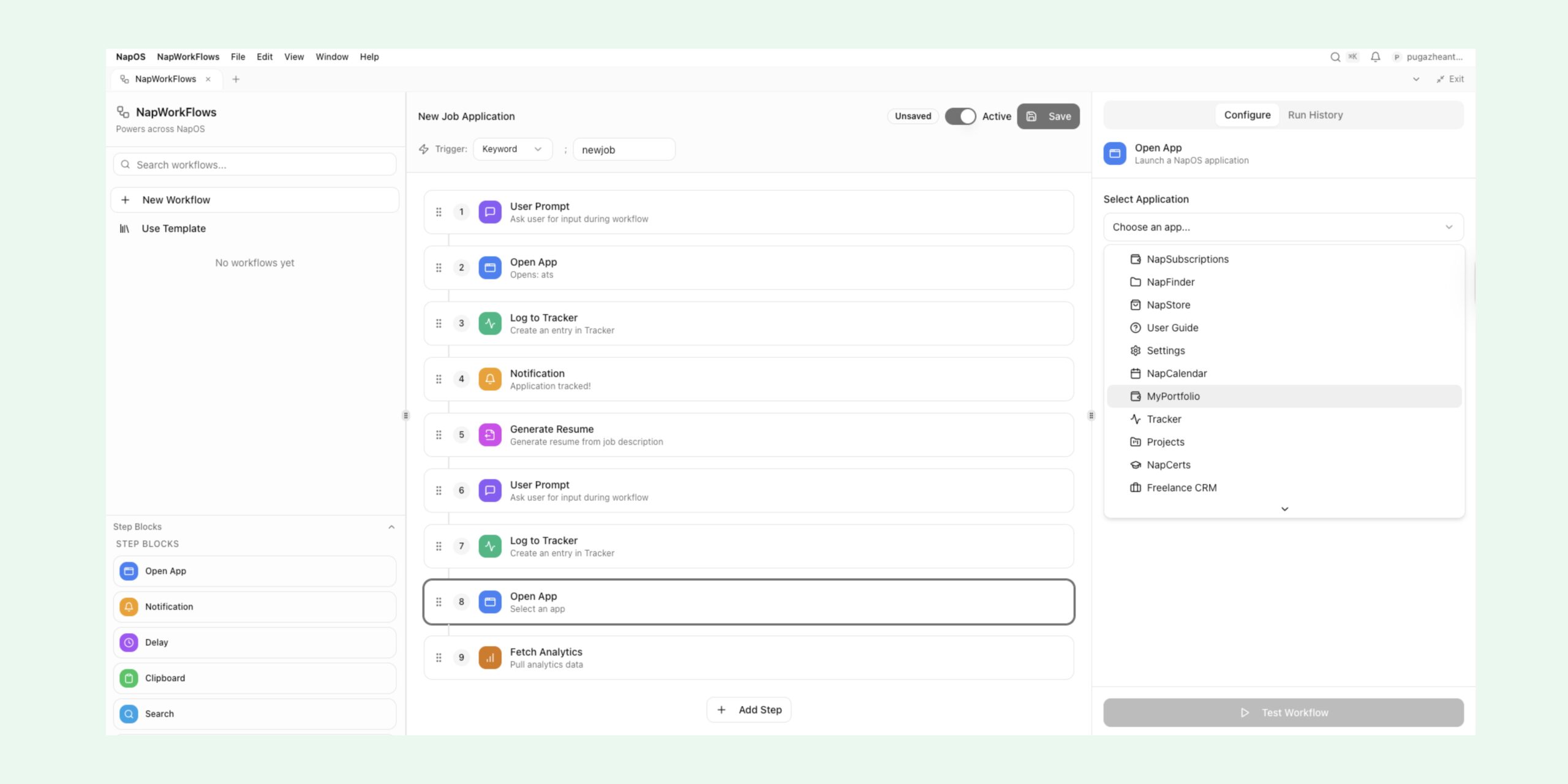
1. New Job Application Workflow
Trigger: Keyword: newjob
Automated Flow:
- Ask for job description
- Open MyPortfolio
- Generate tailored resume
- Log application in Tracker
- Schedule follow-up reminder
- Notify completion
Outcome Template:
“New Job Application — Fully Tracked”
Impact:
No application is ever untracked, forgotten, or undocumented again.
2. Daily Study Evidence Capture
Trigger: Scheduled (daily)
Automated Flow:
- Prompt: “What did you study today?”
- Save response to Tracker
- Attach screenshots or links
- Tag by subject
- Update weekly analytics
Outcome Template:
“Daily Learning Evidence”
Impact:
Learning turns into verifiable proof, not vague memory.
3. Portfolio Auto-Update After Work
Trigger: Project progress update
Automated Flow:
- Detect project update
- Prompt for summary
- Push summary to MyPortfolio
- Attach artifacts
- Log milestone
Outcome Template:
“Portfolio Sync — Project Update”
Impact:
Portfolios stay current without manual rewriting.
4. Recruiter Outreach Draft Generator
Trigger: Keyword: outreach
Automated Flow:
- Ask for company + role
- Pull portfolio highlights
- Generate outreach message
- Copy to clipboard
- Log outreach attempt
Outcome Template:
“Recruiter Outreach Draft”
Impact:
Students stop procrastinating outreach due to writing friction.
5. Interview Preparation Pack
Trigger: Keyword: interview
Automated Flow:
- Ask for role + company
- Pull relevant projects
- Generate interview notes
- Open NapFinder folder
- Schedule preparation sessions
Outcome Template:
“Interview Prep Pack”
Impact:
Preparation becomes structured instead of rushed.
6. Follow-Up Reminder Automation
Trigger: Time-based (X days after application)
Automated Flow:
- Check Tracker entries
- Identify pending applications
- Schedule reminders
- Generate follow-up draft
Outcome Template:
“Application Follow-Up System”
Impact:
Professional follow-ups without relying on memory.
7. Certification Progress Tracker
Trigger: Certification activity update
Automated Flow:
- Log progress in NapCerts
- Attach proof
- Update skill analytics
- Suggest next certification
Outcome Template:
“Certification Evidence Tracker”
Impact:
Certifications become career signals, not PDFs lost in folders.
8. Weekly Execution Report
Trigger: Weekly schedule
Automated Flow:
- Summarise Tracker entries
- Highlight completed work
- Identify gaps
- Generate weekly report
Outcome Template:
“Weekly Execution Report”
Impact:
Students see momentum clearly — or absence of it.
9. Portfolio Health Check
Trigger: Monthly schedule
Automated Flow:
- Analyse portfolio completeness
- Identify missing evidence
- Recommend updates
- Log health score
Outcome Template:
“Portfolio Health Snapshot”
Impact:
Portfolios stay interview-ready year-round.
10. Job Search Analytics Snapshot
Trigger: Keyword: analytics
Automated Flow:
- Pull application data
- Visualise outcomes
- Identify conversion rates
- Save snapshot
Outcome Template:
“Job Search Analytics”
Impact:
Students understand what is working — and what is not.
11. Project Kick-Off Automation
Trigger: Keyword: newproject
Automated Flow:
- Create project folder
- Open Projects app
- Set milestones
- Schedule reviews
- Log intent
Outcome Template:
“New Project Kick-Off”
Impact:
Projects start clean instead of chaotic.
12. Evidence Capture from Clipboard
Trigger: Clipboard change
Automated Flow:
- Detect copied content
- Prompt for context
- Save as evidence
- Tag automatically
Outcome Template:
“Instant Evidence Capture”
Impact:
Important proof never disappears again.
13. External Job Board Sync (Webhook)
Trigger: Webhook from job form/API
Automated Flow:
- Receive job data
- Create Tracker entry
- Attach job description
- Schedule follow-up
Outcome Template:
“External Job Sync”
Impact:
External actions still live inside NapOS.
14. Study → Portfolio Conversion
Trigger: Study session completion
Automated Flow:
- Prompt: “What did you learn?”
- Convert notes into portfolio entry
- Attach references
- Log skill signal
Outcome Template:
“Learning to Portfolio Pipeline”
Impact:
Learning directly increases employability.
15. Monthly Career Review
Trigger: Monthly schedule
Automated Flow:
- Summarise work, learning, applications
- Compare goals vs reality
- Recommend next actions
- Save review
Outcome Template:
“Monthly Career Review”
Impact:
Students operate with clarity, not anxiety.
Why Templates Matter
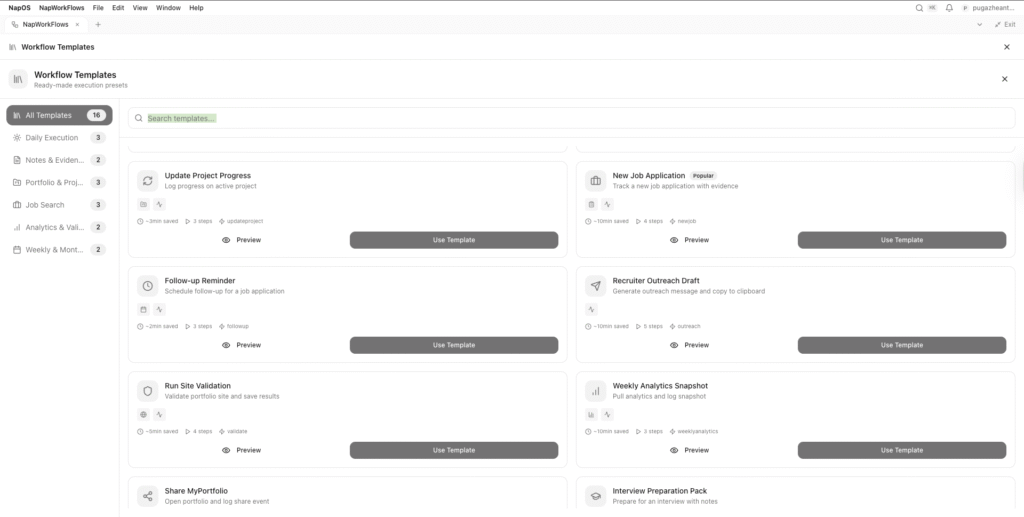
Every workflow above is saved as a template.
This means:
- Students do not start from scratch
- Best practices are embedded
- Consistency replaces randomness
- Execution improves automatically
NapWorkflows is not about automation for automation’s sake.
It is about removing friction from progress.
From Chaos to Systems Thinking
Most students think success requires:
- More motivation
- More discipline
- More tools
NapOS takes a different view:
Success requires fewer decisions and better systems.
NapWorkflows transforms:
- Intent → execution
- Effort → evidence
- Activity → outcomes
Closing: This Is the NapOS Advantage
NapWorkflows is not a feature.
It is a behavioral upgrade.
When students automate:
- They stop forgetting
- They stop duplicating effort
- They stop losing proof
- They stop reacting and start progressing
NapOS does not ask students to work harder.
It makes sure their work counts.
More templates are coming.
More integrations are coming.
But the foundation is already here.
NapWorkflows is how students turn daily actions into long-term advantage.
NapWorkflows helps students track progress through automated systems. Follow updates on LinkedIn.