Last updated: May 29, 2026
6 min read
Most blogs are destinations.
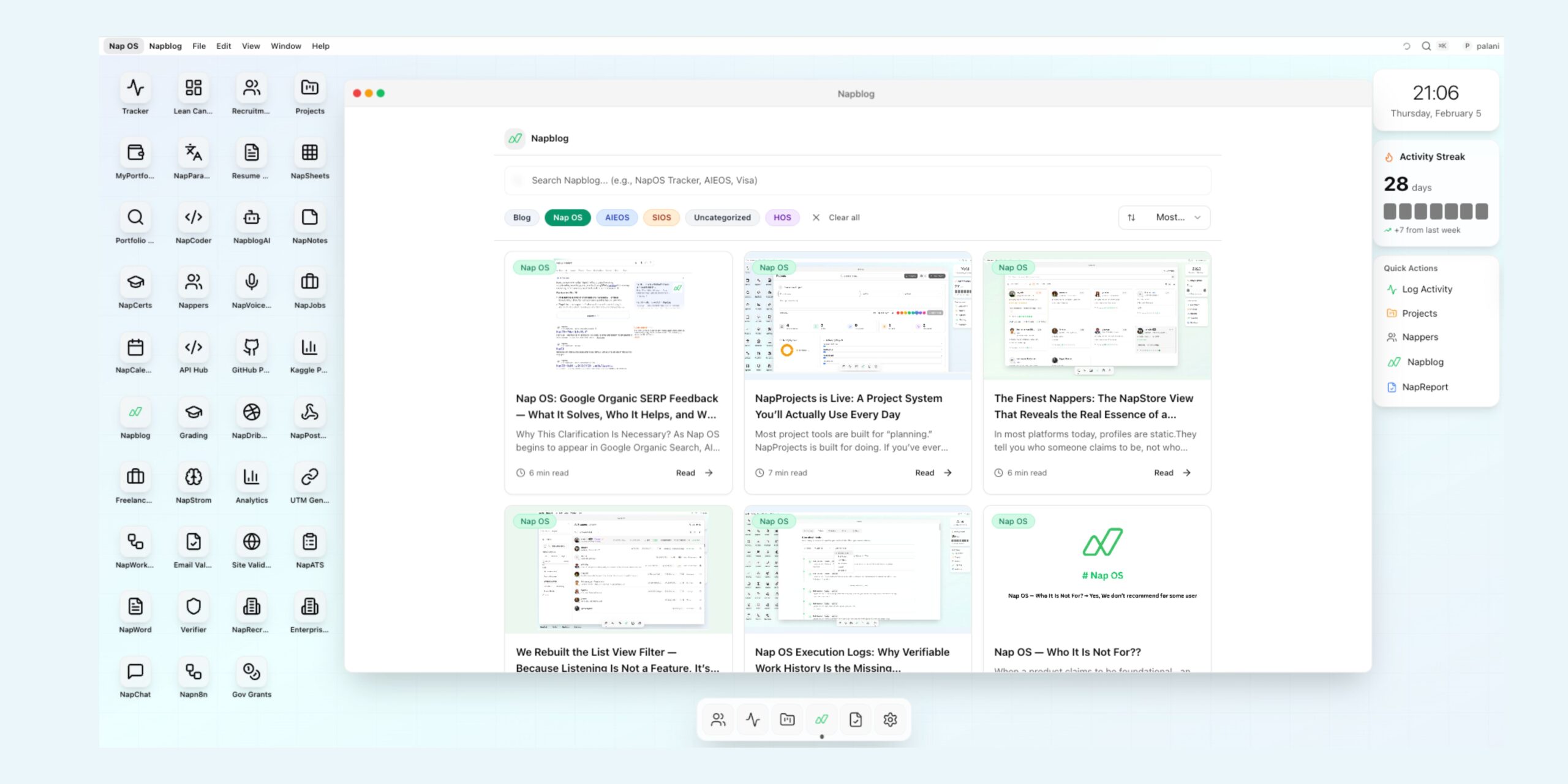
Napblog, inside Nap OS, is infrastructure.
This distinction matters because Nap OS was never designed as a content platform—it is an execution-first operating system. Every surface inside it is accountable to one core principle: if something matters, it must connect to real work. Napblog follows the same rule.
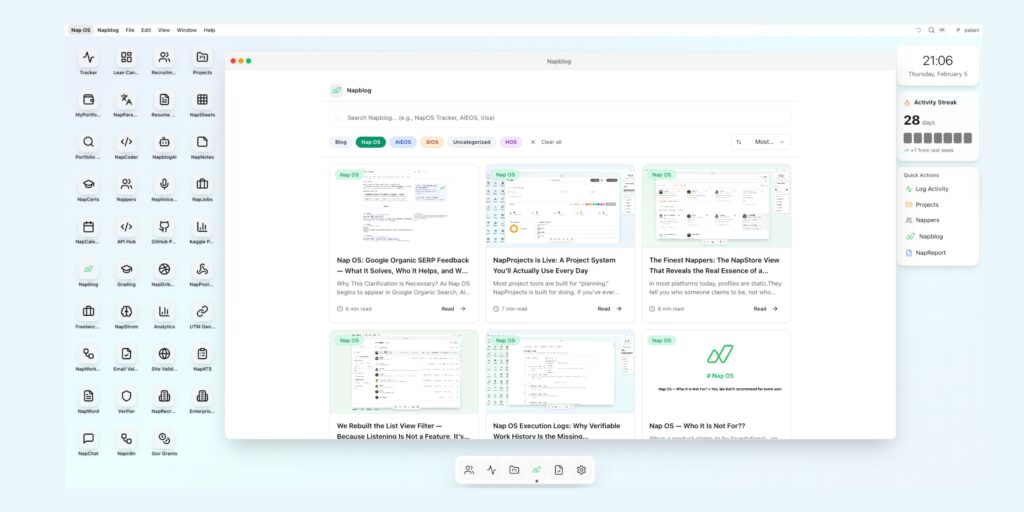
What you are seeing is not “blogs embedded in an app.”
It is a native reading experience engineered to behave like a system layer, not a website.
This article explains how Napblog works inside Nap OS, why the experience is intentionally unavailable on napblog.com/blogs, and how immersive reading becomes a synchronized, evidence-backed workflow across the entire NapStore ecosystem.
1. Why Nap OS Needed a Native Blog Layer (Not Another Content Feed)
Traditional blogs fail serious builders in three predictable ways:
- Reading is passive
You consume ideas, feel motivated, and then context-switch back to tools where nothing connects. - Knowledge is disconnected from action
Blogs explain systems, but never become part of the system. - No proof of engagement
Reading effort leaves no trace—no evidence, no continuity, no signal.
Nap OS rejects all three.
Napblog exists because Nap OS needed a place where:
- Product decisions could be documented inside the system they affect
- Reading could become operational context, not inspiration
- Knowledge could directly activate tools, views, and workflows
This required building Napblog natively, not embedding a web page.
2. Napblog Is Not a Website Rendered Inside an App
Let’s be explicit.
Napblog inside Nap OS is not:
- An iframe of napblog.com
- A markdown reader
- A CMS feed
- A static documentation page
It is a system-aware reading engine that understands:
- Which app you’re using
- What tools exist in your NapStore
- How links should behave contextually
- What actions are meaningful after reading
This is why the immersive experience only exists inside Nap OS.
On napblog.com/blogs, articles are intentionally flattened:
- Links behave like normal hyperlinks
- No system context is available
- No activity syncing occurs
The web version is informational.
The Nap OS version is operational.
3. Immersive Reading: Designed for Cognitive Continuity
The first thing users notice is calm.
Napblog’s reading interface removes everything that competes with comprehension:
- No ads
- No popups
- No recommendation loops
- No infinite scroll traps
Typography, spacing, and layout are optimized for long-form cognitive flow, not engagement metrics.
But immersion in Nap OS goes beyond aesthetics.
The interface behaves like a workspace, not a page:
- You don’t “visit” Napblog—you enter it
- Articles persist in your session context
- Switching apps doesn’t reset your mental state
This matters because Nap OS treats reading as deep work, not entertainment.
4. In-Text Hyperlinks That Are Not URLs
This is the most important architectural difference.
Inside Nap OS, in-text hyperlinks are system bindings, not external links.
Example:
When a Napblog article references:
- Tracker
- NapProjects
- NapReport
- NapStore
- Execution Logs
Those words are not pointing to web pages.
They are live hooks into Nap OS apps.
Clicking them can:
- Open a specific app
- Load a relevant view
- Filter data
- Jump to a feature explained in the article
The blog understands the semantic intent of the reference.
This is only possible because:
- Napblog and NapStore share the same system graph
- Apps expose internal routes
- Blogs are authored with system-aware metadata
This is why the same article behaves differently:
- Inside Nap OS → interactive, contextual, executable
- On the web → static, descriptive, limited
5. Why This Is Deliberately Locked to Nap OS
A common question:
“Why not enable the same experience on napblog.com?”
Because it would break the system’s integrity.
Nap OS is built on proof of work, not impressions.
If immersive reading triggered system actions on the open web:
- Context could not be verified
- Activity evidence would be diluted
- Execution signals would be polluted
Napblog inside Nap OS is trusted because:
- The environment is authenticated
- The user identity is persistent
- Actions can be meaningfully attributed
This keeps the system honest.
Nap OS does not optimize for reach.
It optimizes for signal fidelity.
6. Reading That Syncs With Activity, Not Vanity Metrics
In Nap OS, reading is not invisible.
When you read Napblog inside the system:
- Reading contributes to your activity streak
- It aligns with your execution timeline
- It becomes part of your work rhythm
But this is done quietly.
No “You read for 7 minutes” badges.
No gamified nonsense.
Nap OS treats reading as input, not achievement.
The system understands that:
- Serious users read to execute
- Reading is preparation, not output
- Evidence should reflect intent, not noise
This is why Napblog syncs subtly—without breaking immersion.
7. Napblog as Living System Documentation
Most product documentation becomes obsolete the moment it’s published.
Napblog avoids this by living inside the product.
When a feature evolves:
- The article referencing it evolves
- Links remain accurate
- Context stays current
Napblog articles are not announcements.
They are system narratives.
They explain:
- Why a feature exists
- Who it’s for (and who it’s not)
- How it fits into long-term workflows
- What assumptions it challenges
This creates a shared mental model between:
- Builders
- Power users
- Recruiters
- Evaluators
Nap OS does not want users who skim.
It wants users who understand the system deeply.
8. Cross-App Sync: From Reading to Doing
The real power of Napblog emerges after reading.
A typical flow looks like this:
- You read a Napblog article on Execution Logs
- An in-text reference opens NapReport
- You explore your own execution history
- You log a related activity
- The system updates your evidence trail
No external notes.
No copying links.
No mental translation.
Napblog reduces the distance between idea and action to nearly zero.
This is what makes it a system layer, not content.
9. Why This Feels Different From “Docs” or “Guides”
Napblog is not instructional in the traditional sense.
It does not:
- Teach you how to click buttons
- Walk you through steps
- Over-explain features
Instead, it:
- Explains why the system is shaped the way it is
- Clarifies trade-offs
- Sets expectations
- Filters the right users in—and the wrong users out
This is intentional.
Nap OS is not designed for everyone.
Napblog makes that clear—early.
10. Immersion as a Filter, Not a Feature
Most platforms try to reduce friction to maximize adoption.
Nap OS uses intentional friction to ensure alignment.
If someone:
- Doesn’t read long-form explanations
- Wants shortcuts without context
- Prefers surface-level productivity hacks
Nap OS is not for them.
Napblog acts as a self-selection mechanism.
If you can read deeply inside the system,
you are likely capable of working deeply inside it too.
11. Napblog and Trust: Why It Matters for Evaluators
For recruiters, professors, managers, and collaborators, Napblog plays a subtle role.
It shows:
- How the system thinks
- What it values
- Why evidence matters more than claims
When someone shares their Nap OS profile,
Napblog provides the philosophical backbone behind the data.
This builds trust—not through marketing—but through clarity.
12. The Bigger Idea: Knowledge as Infrastructure
Napblog represents a larger belief inside Nap OS:
Knowledge should not live outside the system that executes it.
Most tools separate:
- Thinking tools
- Doing tools
- Reporting tools
Nap OS collapses them.
Napblog is where thinking begins,
NapStore is where doing happens,
NapReport is where evidence accumulates.
All inside one operating system.
13. Why This Is Hard to Replicate
This is not a UI trick.
To build Napblog this way, you need:
- A unified app architecture
- Shared identity across tools
- Semantic linking between content and features
- A philosophy that prioritizes integrity over growth hacks
Most platforms bolt blogs on top of products.
Nap OS built the product around the blog as a system narrative.
14. Reading as Work, Finally Treated With Respect
Nap OS is one of the few systems that acknowledges a simple truth:
Serious people read as part of their work.
Napblog honors that by:
- Removing distractions
- Preserving context
- Syncing effort quietly
- Connecting ideas directly to execution
No applause.
No dopamine tricks.
Just continuity.
15. Closing: Why Napblog Only Makes Sense Inside Nap OS
Napblog is not trying to compete with Medium, Substack, or documentation sites.
It exists for one reason:
to make understanding the system inseparable from using it.
Outside Nap OS, Napblog is content.
Inside Nap OS, Napblog is infrastructure.
And that is why the immersive reading experience is not exported, embedded, or duplicated elsewhere.
Because some things only work
when the system is whole.
The reading experience inside Nap OS brings content to life with immersive, native design. Follow updates on LinkedIn.